How to Find Your iPhone with Amazon Echo and Alexa
Let’s say you’re sitting on the couch and realize you can’t find your iPhone. If you have an Apple Watch you can use it to ping your phone and figure out where it is. If not, your Amazon Echo can come to the rescue. Seriously. If you have an Amazon Echo you can use it to find your iPhone.
Before we get started you’ll need a couple things: an Amazon Echo, Echo Dot, Echo Plus or Echo Show, along with a free IFTTT account. You can set up an account at the IFTTT website, or in their iPhone and iPad app.
You can set up your Echo-based iPhone finder in IFTTT’s web interface or the iOS app. We’ll use the app because it’s pretty easy and automatically takes you where you need to go for the various account linking steps you may need to complete.
Here’s how to set up your Amazon Echo to help find your iPhone:
- Launch the IFTTT app on your iPhone or iPad and tap Search
- Now search for “find iPhone”

Search for Amazon’s “find phone” recipe
- Choose Tell Alexa to find your phone (by Amazon). If you haven’t given IFTTT permission to talk with your Echo you’ll get a dialog walking you through the set up.
- Tap Turn on
- Tap OK to give IFTTT permission to call your phone
- Enter your iPhone’s phone number
- Tap Send PIN
- The PIN is delivered by an automated voice phone call, not SMS, so be sure to answer your phone
- Enter PIN
- Tap Connect
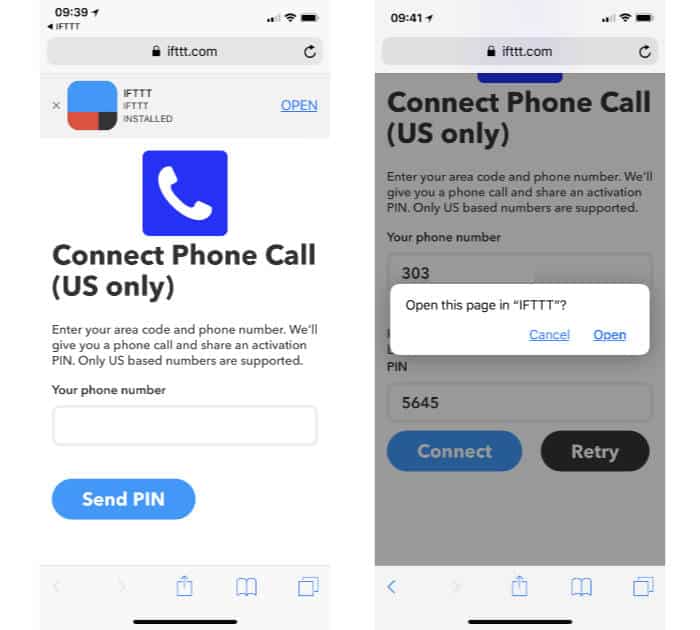
IFTTT needs permission to call your phone
- Tap Open
- Enter the phrase you want to say. The default is “find my phone,” so I left that.
- Tap Save

Your finished IFTTT recipe, ready to call your iPhone
To find your iPhone with your Echo device, say, “Alexa, trigger find my phone.” You’ll get a call from IFTTT and if all goes well your iPhone will be near enough you can hear it ring or vibrate. If you don’t answer the call IFTTT will leave an automated voice mail telling you when the recipe was triggered.
Of course, you’ll want to set this up before you lose your iPhone since you need to listen to a phone call to get IFTTT’s PIN. A little preparation ahead of time can save a lot of frustration.
Awesome article, it was exceptionally helpful! I simply began in this and I'm becoming more acquainted with it better! Cheers, keep doing awesome! amazon addison
ReplyDelete