iPhone X: How to See Notification Center
The Home button is gone on the iPhone X and replaced with the swipe up gesture, and Control Center’s gesture moved to the top of the screen. So what happens to the Notification Center gesture? It’s still there, but not exactly in the same place.
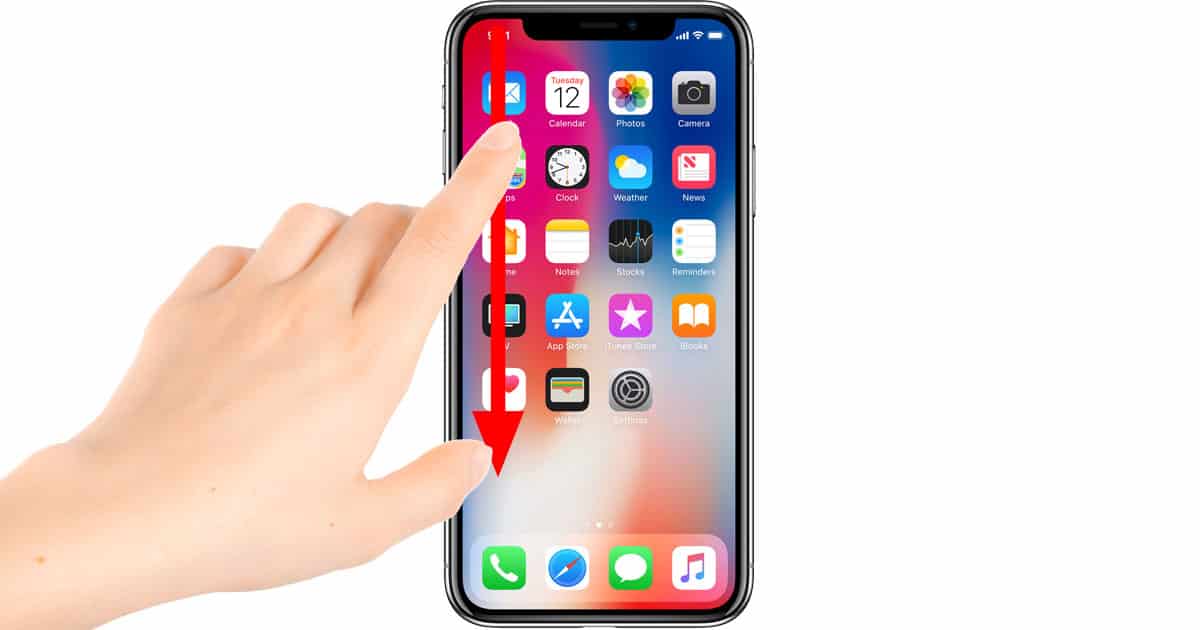
Swipe down from the left horn to see the iPhone X Notification Center
Seeing Notification Center on every iOS device except the iPhone X is takes just a swipe down from the top of the screen. Since Control Center’s gesture took over the right horn—the space just to the right of the black camera and sensor notch—Notification Center’s gesture had to shift over a little bit.
To see Notification Center on the iPhone X swipe down from the left horn. The upside to the updated Notification and Control Center gestures is that you have a visual cue of sorts: Left horn is Notifications, and right horn is Control Center.
Looking for more iPhone X gestures?
- How to Get to the Home Screen
- How to Access Control Center
- How to Use Reachability
- How to Use Fast App Switching
- How to Quit Apps
Thank you for the update, very nice site.. Iphone gebraucht
ReplyDelete