You Have Me to Blame for the iTunes 12.7 Fiasco…
Dr. Mac’s Rants & Raves
Episode #245
Rant ON.
You have to be careful what you wish for. I’m afraid I’m at least partly to blame for last week’s iTunes 12.7 fiasco.
iTunes Must Die Redux
See… Last year I wrote, produced, recorded, and released a song called, “iTunes Must Die.” with lyrics that included:
It’s inconsistent, confusing and jumbled…it don’t happen often, but Apple has stumbled…
and concluded:
A thing you could do that would right all your wrongs… just let iTunes go back to being about songs.
Not surprisingly, the song was rejected by the iTunes Store, so I made it a free download. And, for even more iTunes bashing fun, check out my unfinished music video excerpt here.)
Anyway, I’m afraid I got what I asked for. But I don’t like it. Not a bit. I mean, the song went on to say:
If you make a new app that’s just for syncing… iTunes would surely do much less stinking.
What I wanted was a more streamlined, less bloated iTunes. I envisioned separate Mac apps for syncing and perhaps other features like movies and TV shows. What I got a more streamlined, less bloated iTunes, alright. But now there’s no way to sync or manage iOS apps on my Mac!
The iTunes 12.7 Fiasco in a Nutshell
Long ago we really loved iTunes. Then, Apple began bolting on additional functions such as app stores, device syncing, music stores, movie and TV show stores, podcasts, ringtones, and more. Over time, iTunes became a confusing, bloated mess. Still, there were things it excelled at, one of which was managing my collection of over 2000 iOS apps.
Last week my MacBook Pro automatically upgraded iTunes to version 12.7 and I was greeted with this alert when I launched it:
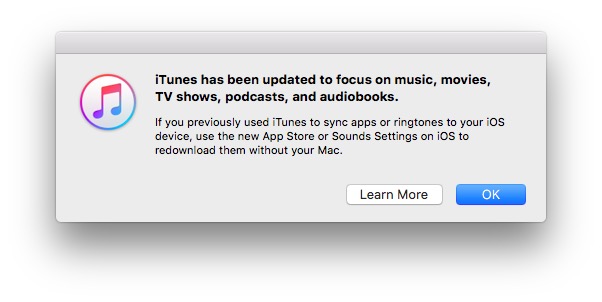
These 44 words mean you can’t use your Mac (or PC) to manage iOS apps or ringtones anymore.
I was shocked. iOS apps and the iOS App Store have been removed from iTunes 12.7, and you can no longer manage them using your Mac (or PC). After you install iTunes 12.7—which is required if you’re going to use iOS 11— you’ll only be able to buy and manage your iOS apps on an iOS device.
That sucks eggs. I have over 2,000 iOS apps. Do you know how long it takes to scroll through a list of 2,000 ANYTHING on an iPhone?
And, what about changing the order of my 12 Home screens? I used to do that in iTunes, but I don’t see any way to do it at all now!
Here’s another headscratcher: There are 2,457 files in my iTunes Mobile Applications folder, taking up a whopping 161GB of disk space. Do I need them anymore? Is it safe to delete them? Should I archive them first? And, if an app is no longer available in the App Store but I have a copy on my hard disk, is there any way to install or restore it?
Apple published a support article entitled Changes in the new iTunes yesterday, with links to separate articles that show you new and less convenient ways to download apps, podcasts, books, and ringtones. The technique to export ringtones from GarageBand now is particularly hilarious:
- Choose Share Ringtone to iTunes.I know iTunes doesn’t support ringtones anymore but choose it anyway. Don’t bother looking for your ringtone in iTunes, either. That would be easy. Instead, you must use the new, far less-convenient and totally unintuitive method:
- Navigate to the Import folder inside your iTunes Media folder.
- Identify the ringtone you just shared from GarageBand.
- Drag the ringtone onto the iTunes sidebar.Note that if you don’t drag the ringtone onto precisely the right spot in the iTunes sidebar, or your iPhone isn’t connected and selected when you drag it, nothing will happen.If that happens:
- Return to step 2 and try dragging the file more precisely.
- Select Share Ringtone to iTunes in GarageBand.
- Sync iPhone.
- There were no steps 3, 4, or 5.
Rant OFF.
There is one last thing… here are the rest of the lyrics to iTunes Must Die:
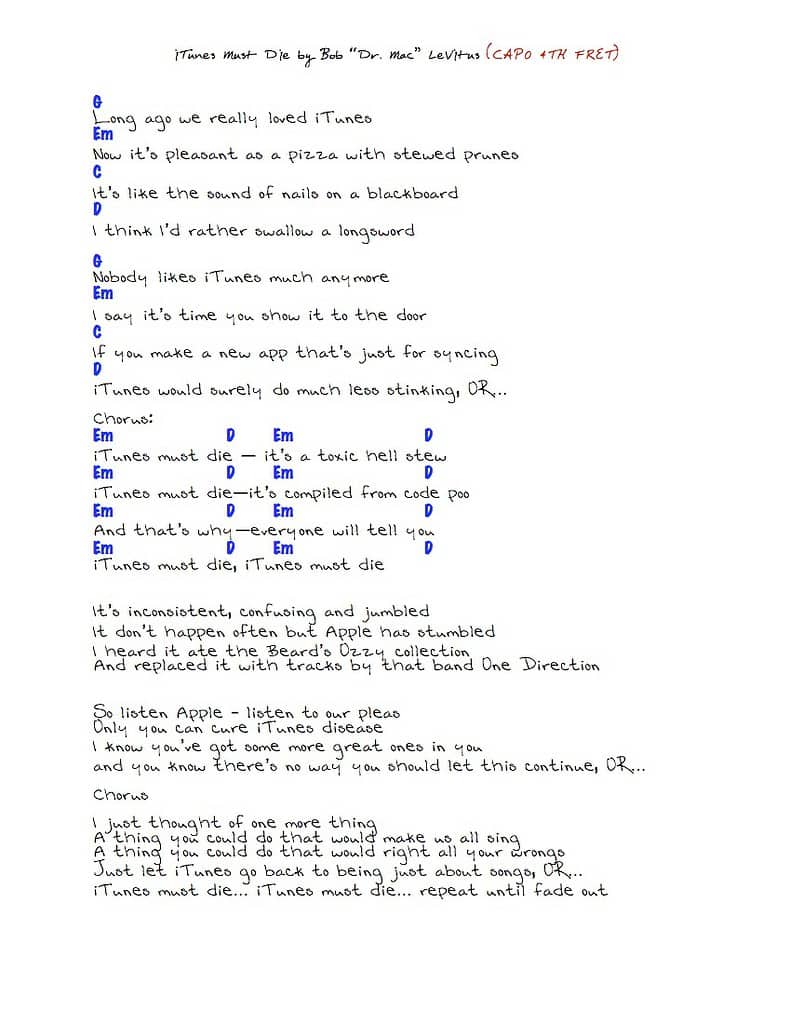
iTunes Must Die! By Bob “Dr. Mac” LeVitus: Lyrics and guitar chords.
0 Response to "You Have Me to Blame for the iTunes 12.7 Fiasco…"
Post a Comment