iOS 10 Music Player: Where Are the Shuffle and Repeat Buttons?
iOS 10 makes some nice changes to the music player app. Unfortunately, the Repeat and Shuffle buttons no longer appear at the bottom of the Now Playing screen. Where’d they go? They’re still there, but slightly hidden.
_______________________
iOS Music Player Changes
In the music player in iOS 9.x, the the Repeat and Shuffle buttons were at the bottom of the Now Playing screen. It looked like this.
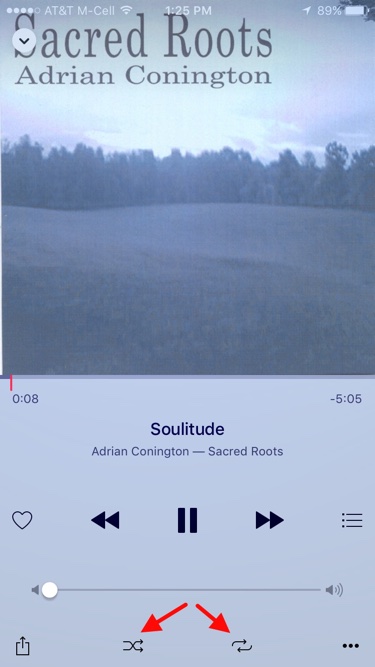
iOS 9 Music Player: Now Playing
For iOS 10, Apple revised the operation of the music player a bit. I think it’s better because the type, layout and operation are cleaner and simpler. For a full discussion, see David Chartier’s: “Music for iOS 10: A Tour of the Big Changes.”
In short, with the new music player, all you need to do is swipe upwards on the Now Playing screen. That reveals a second screen “below the fold” as David describes it. The Repeat and Shuffle buttons are now at the top of the Up Next screen. It looks like this. (I only did a partial scroll).
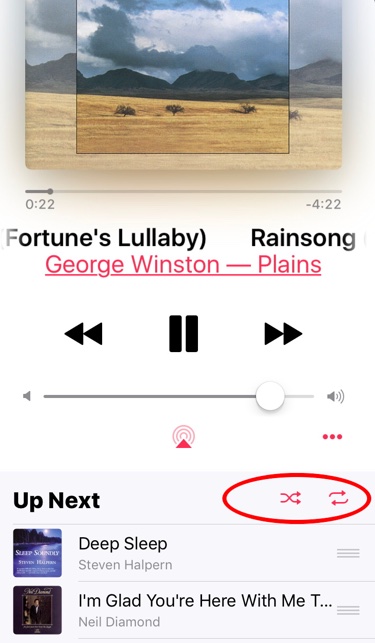
iOS 10 Music Player: Now Playing. Swipe upwards to see Up Next.
Why did Apple do this? My theory on why the Up Next screen is a swipe instead of a button push is that it’s easier to swipe when running or walking. Locating and pressing a small button to see Up Next is not as easy.
But you still have to tap the Repeat and Shuffle buttons. Why not leave them where they were? That’s a mystery to me. Perhaps only the mind of Apple SVP Craig Federighi knows why they had to be hidden on the screen below.
But now you know too.
0 Response to "iOS 10 Music Player: Where Are the Shuffle and Repeat Buttons?"
Post a Comment